[Realm Compatible]Advanced world manager with keep inventory
Advanced Worlds Manager
Take full control of your Minecraft Bedrock worlds with the Advanced worlds Manager addon! This powerful tool provides a simple, intuitive in-game UI for admins to manage crucial gameplay rules, a comprehensive player ranks system, and special perks on the fly. Say goodbye to complex commands and hello to a seamless server management experience!
please subscribe we are trying to reach 500 subs all support is appreciated :)
You May Also Enjoy The Addon Below!!
[Realm Compatible] RPG Skills & Prestige: Evolved - Minecraft Bedrock Addons - CurseForge
Key Features You Need the tag Admin to use this
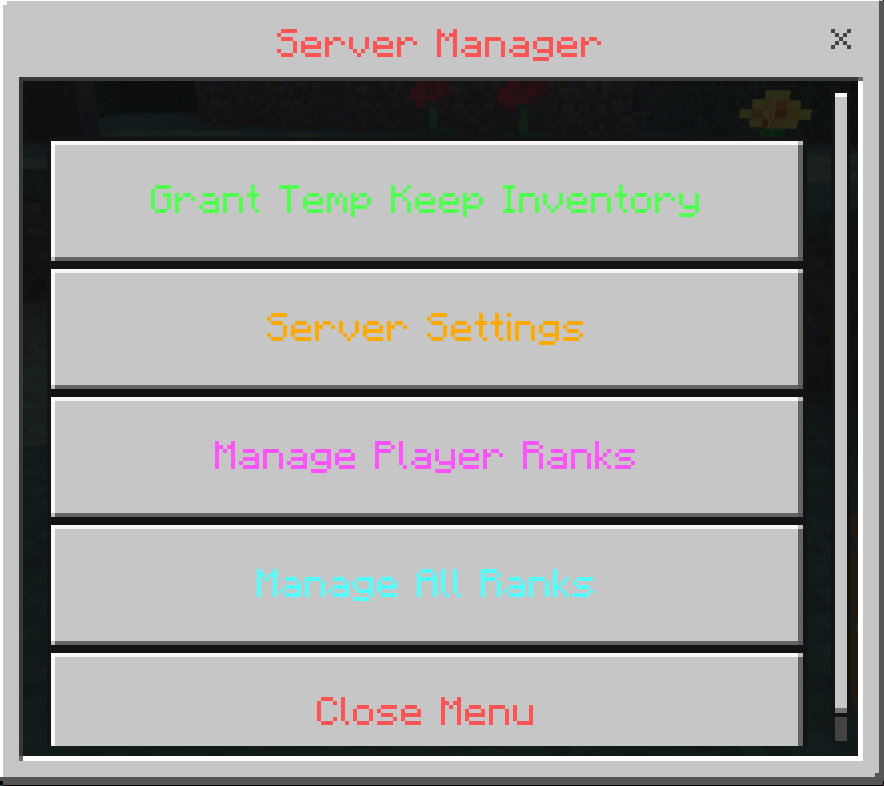
Temporary Keep Inventory
- Grant Timed Access: Give any player Keep Inventory for a specific duration (in minutes).
- Automatic Restoration: When a player with the buff dies, their inventory is saved and fully restored upon respawn.
- Lag-Free: Clears the dropped items at the player's death location to prevent server lag.
Dynamic Settings
- Time-Based PvP: Automatically enable PvP during the day and disable it at night.
- Time-Based Mob Loot: Automatically disable mob loot during the day and enable it at night.
- Automatic Item Clearing: Keep your server clean by automatically clearing all dropped items when day begins.
- Custom Day/Night Cycle: Define the exact in-game ticks when your server's day and night begin.
- Toggle Modules: Enable or disable entire modules, like the Ranks system, at any time.
Comprehensive Ranks System
- Create & Manage Ranks: Design unique ranks with custom IDs and colorful display names (e.g.,
§6Owner,§bVIP). - Assign Ranks to Players: Easily add or remove ranks from any player on the server.
- Chat Prefixes: Assigned ranks automatically appear as prefixes in the in-game chat.
- Default Rank: Set a default rank that is automatically assigned to all new players.
Intuitive Admin UI
- Simple Access: Admins can open the menu by simply using a Clock. or You can now simply type the command
/scriptevent nasa:managerin the chat - Interactive Forms: Navigate through clear and descriptive menus to manage players and settings.
- No Commands Needed: Forget memorizing long commands. If you can click a button, you can manage your server!
How to Use
Getting started is incredibly simple:
- Become an Admin: To access the menu, you must have the
Admintag. Give it to yourself with this command:/tag @s add Admin - Open the Menu: Hold a Clock (
minecraft:clock) and use it (right-click or long-press on mobile). or You can now simply type the command/scriptevent nasa:managerin the chat - Manage Your Server: You now have full access to all the features!
⚠️ Important Requirements & Realms Setup
For this massive addon to function without errors, you MUST enable Cheats and the following experimental world setting:
- Beta APIs
Playing on a Server or Realm?
Because Bedrock does not allow direct activation of script experiments on active Realms, follow this specific deployment process:
- Create a new world (or download your current active Realm) to your local device.
- Navigate to World Settings, and toggle on Cheats and Beta APIs.
- Activate the Addon Behavior Pack and Resource Pack under your world settings.
- Upload this newly configured world file directly back to replace your active Realm slot!
Our Socials
-
- Nasaremix Studios Discord: https://discord.gg/6rjTGkRBzP
- YouTube Channel: https://www.youtube.com/@Nasaremixstudios
- Twitch Live everyday: https://www.twitch.tv/nightvorn
Usage Guidelines
What You Can Do:
- Use this addon freely on your worlds, servers, and Realms.
- Share feedback and suggestions to help improve the addon.
- Enjoy its features within these guidelines.
What You Can’t Do:
- Do not create separate links for the addon without permission.
- Do not steal or copy any part of the addon for personal projects.
- Do not redistribute the addon as your own work.
- Do not edit or share modified versions of the addon.
Note
⚠️ The ONLY official pages to download my addons are:
Modbay nasaremix
https://mcpedl.com/user/nasa-x-remix/
https://www.curseforge.com/members/nasaremix/projects
Any other site or repost is unauthorized and may contain stolen or unsafe files.