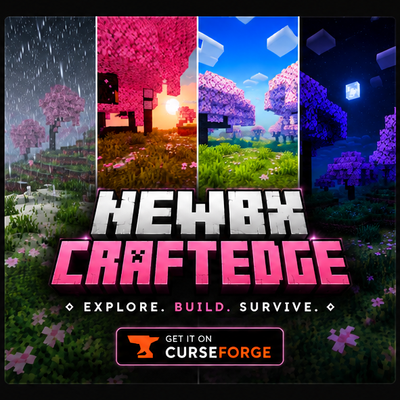
Newb X CraftEdge
🎨 CraftEdge Visuals
A realism-focused visual overhaul for Minecraft Bedrock
Richer fog. Deeper shadows. Reflective water. Built to make your world feel alive.
✨ Overview
CraftEdge Visuals reimagines the way Minecraft Bedrock looks — from thick atmospheric fog rolling across valleys, to sunlight breaking through the trees, to water that reflects the sky above it. Every effect is hand-tuned for a natural, cinematic feel while staying light enough for mobile devices.
🌫️ Atmosphere & Fog
- Denser, height-based fog that hugs the ground and fades with altitude
- Natural distance haze that intensifies with weather — thicker mist in rain, stronger haze on cloudy days
- Smooth exponential falloff for realistic depth perception
☀️ Lighting & Godrays
- Strong volumetric godrays for dramatic light shafts through trees and caves
- Deeper shadow contrast for a grounded, natural look
- Balanced ambient light so shadows stay readable, never flat
💧 Water
- Subtle sky & cloud reflections — softened and partial for a more natural, less mirror-like surface
- Moon reflections at night — water now catches and reflects moonlight after dark
- Sharper wave ripples for crisp surface detail
- Realistic sun specular highlight that tracks the light source
- Clearer water with a natural blue-green tint
🌧️ Rain & Wet Surfaces
- Reflective wet ground with scattered, natural puddles
- Stronger puddle reflections during rainfall
☁️ Clouds
- Soft forward-scattering glow when clouds face the sun
- Realistic shading based on light direction
⚠️ Compatibility
This shader pack requires a material/render binary loader to function — it will not work on official, unmodified Minecraft. Follow the setup guide below for your platform.
📲 How To Use
🤖 Android
- Download the
.mcpackfile from this page - Open it with MB Loader — it will automatically import the pack
- Open Minecraft and go to Settings → Global Resources
- Find CraftEdge Visuals in the list and activate it
- Restart Minecraft for all effects to fully apply
🪟 Windows
- Download BetterRenderDragon
- Follow the installation guide included with BetterRenderDragon
- Import the Newb CraftEdge Shader resource pack
- Enable it in Settings → Global Resources
- Restart Minecraft
🐧 Linux (x86_64)
For mcpelauncher-manifest users only.
- Download mcpelauncher-manifest
- Download mcpelauncher-materialbinloader
- Import the Newb CraftEdge Shader resource pack
- Enable it in Settings → Global Resources
- Restart Minecraft if necessary
Tip: Applying it under Global Resources (not just a single world) ensures effects like fog, water, and lighting apply everywhere.
🙌 Credits & License
CraftEdge Visuals is a modified variant of Newb Shader by devendrn, used and redistributed under the terms of the MIT License.
🔗 Original project: https://github.com/devendrn/newb-x-mcbe
How this project differs from the original:
- Increased fog density and added stronger height-based fog with natural distance haze
- Boosted volumetric godray intensity for more dramatic light shafts
- Enabled and enhanced ground reflections with stronger rain puddle reflections
- Reworked water rendering — softened, partial sky/cloud reflections, added night-time moon reflections, sharper ripple detail, a realistic sun specular highlight, and adjusted transparency/tint
- Added forward-scattering sunlight glow to clouds
- Increased shadow contrast and rebalanced ambient lighting
- Custom CraftEdge branding and title screen logo
This project is compiled and distributed in accordance with the MIT License terms of the original Newb Shader project. Full license text is included with the pack.
💜 Made with care by the CraftEdge team
Enjoy the pack? Leave a rating — it helps a lot!
Need help or found a bug? Join our Discord for support with MB Loader or anything else.