
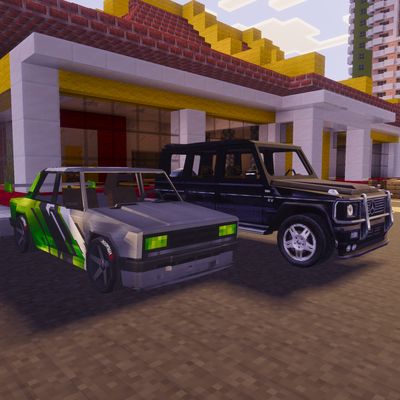
Nuckem Vehicles
Nuckem Vehicles Add-On for Minecraft Bedrock
Bring high-quality, realistic vehicle simulation to your Bedrock worlds. The Nuckem Vehicles Add-On features an advanced driving engine, realistic collision damage, sequential manual gearing, drifting, a functional refueling system, and interactive car parts.
🚗 Extensive Car List
Drive a wide variety of domestic classics and foreign imports, including:
- Classic Sedans & Wagons: VAZ 2104, VAZ 2108, Volga, Audi, Ford, Mercedes W140, E22, E36, Starion, RX7.
- Off-Road & Utility: Niva, G-Class (Stock & Rusty variants), ZIL, KAMAZ (Stock, Power, Rusty, and Dump-truck variants).
- Special Vehicles: Police cruiser and emergency response.
🛠️ Key Add-on Features
1. Advanced Driving Physics & Controls
- Terrain Alignment (Pitch & Roll): Vehicles dynamically lean forward/backward and roll sideways to match hills, slopes, and uneven terrain.
- Sequential Gearbox: Shift through Gears 0 to 4 plus Reverse and Park. Experience realistic shifting delay and RPM drop.
- Slope Speed Reduction: Heavy vehicles will experience speed loss when climbing steep hills, requiring you to shift to lower gears.
2. Manual Drift & Boost System
- Drifting: Hold the Jump key while cornering to execute a manual drift with tire smoke and skid marks.
- Exhaust Backfire: Active exhaust backfire with visual sparks and smoke particles occurs during hard acceleration or drift.
- Boost: Accumulate drift charge and release the jump button to gain a brief visual and physical speed boost.
- Horn: Tap the Jump button quickly to sound a custom horn (or police siren on emergency vehicles).
3. Visual Damage & Crash Mechanics
- Collision System: Ramming walls or entities at speed calculates damage based on velocity. Screen shake is applied to the driver.
- Damage Stages: As vehicle health drops (200 HP max), physical smoke stages appear:
- Light damage: White smoke.
- Heavy damage: Dense grey smoke.
- Engine failure: Dark black smoke, engine stalls, and the car stops completely.
- Repairing: Use a Repair Kit to restore vehicle health.
4. Interactive Car Parts
Every vehicle dynamically spawns linked interactive sub-entities:
- Passenger Seats: Multiple seats with openable/closable doors.
- Trunks (Bags): Hopper or chest-sized storage units depending on vehicle type. Includes an open/close visual state.
- Hoods: Openable hoods to inspect the engine bay.
- Auto-Close: Starting the vehicle and moving (Gear >= 1) automatically closes all passenger doors, hoods, and trunks for safety.
5. Full Fuel & Refueling System
Fuel Pumps: Take the fuel nozzle (adds a pistol item to your inventory). Walk over to the car tank to refuel. Returning the nozzle to the pump clears the item.
Fuel Canisters: Carryable canisters that store up to 20L. They feature an lore-based tracking system showing fuel remaining and a unique canister ID. Canisters can also be placed on the ground as physical objects.
Fuel Pump Explosions: Colliding with fuel pumps at high speed triggers massive, fiery explosions!
6. Configuration & Customizable HUD
Settings Item: Opens a settings panel to toggle fuel consumption, vehicle/mob damage, slope speed reduction, and explosive fuel pumps.
HUD Editor: Customize your dashboard location and switch the speedometer unit between KM/H and MPH.
Custom Cameras: Features dynamic third-person cameras, third-person front cameras for reversing, and an advanced, collision-free custom camera that zooms in when obstructed by blocks.
🔧 How to Drive
1. Spawn a vehicle.
2. Hold the Key and interact with the vehicle to sit and start the engine.
3. Use your movement keys to steer and accelerate.
4. Use the attack/interact buttons to shift gears.
5. To change paint colors, hit the vehicle with a Wrench (Sneak to cycle backward).
⚠️ Requirements
Make sure to enable the following world experiments:
- Beta APIs
- Upcoming Creator Features (recommended)
