Simple HeaIth Indicator (fs)
Simple Health Indicator
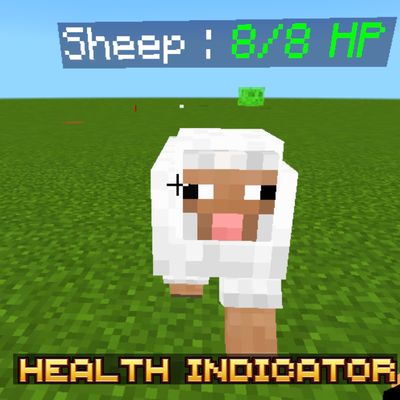
Enhance your combat experience with Simple Health Indicator, a lightweight Minecraft Bedrock addon that displays the current health of any entity you are looking at. Whether you're battling hostile mobs, fighting custom bosses, or playing PvP with friends, you'll always know exactly how much health your target has remaining.
Designed with performance in mind, this addon is incredibly lightweight at less than 1 MB (approximately 600 KB). It only checks the entity you're currently aiming at with your crosshair, ensuring smooth gameplay without unnecessary background processing or lag.
✦ Features
- Displays the target's current health in real time.
- Works with vanilla mobs, custom entities, and players.
- Shows both the entity's name and its remaining HP.
- Health updates instantly whenever the target takes damage or heals.
- Color-Coded HP Indicator — HP text automatically changes based on the target's remaining health: High Health, Medium Health, Low Health.
- Only activates when your crosshair is pointing directly at an entity, minimizing unnecessary processing.
- Extremely lightweight (around 600 KB).
- Optimized for smooth gameplay with virtually no performance impact.
- Perfect for survival, PvP, adventure maps, boss fights, and custom worlds.
✦ Why Use Simple Health Indicator?
Knowing exactly how much health an enemy has makes combat more strategic and enjoyable. Instead of guessing whether your next hit will finish the fight, you'll receive accurate health information instantly while keeping your screen clean and uncluttered.
Since the addon only displays information for the entity currently under your crosshair, it avoids constantly scanning nearby mobs. This smart approach keeps performance smooth even in busy worlds with many entities.
✦ Compatibility
- Achievement Friendly ✅
- No Experimental Features Required ✅
- Multiplayer Friendly ✅
- Works with Existing Worlds ✅
- Minecraft Bedrock Edition Supported ✅
- Supports Vanilla Mobs, Custom Entities, and Players ✅
✦ Installation Guide
- Download the addon file.
- Open it using ZArchiver or any file manager app.
- Select Open With and choose Minecraft.
- Wait for the addon to import.
- Open your world settings.
- Go to Behavior Packs.
- Activate Simple Health Indicator.
- No Experimental Features are required.
- Join your world and simply aim your crosshair at any supported entity to view its health.
Created by FleetMc Studio